
Tableau Training on Tap - Fast Track
Our Tableau Desktop Fast Track course combines all of our Foundation (Fundamentals) and Analyst (Intermediate) content into a 6 half day live online course with added access to online bonus content of 3 additional modules. Gathering Requirements, Bring Your Own Data and Engaging Users.
Trusted By










Tableau is an intuitive and simple tool to learn. This Tableau training course is a jumpstart to getting report writers and analysts who are self-taught or have no previous knowledge to being productive. It covers everything from connecting to data, through to creating interactive dashboards with a range of visualisations in three days. Having a quick turnaround from starting to use Tableau, to getting real, actionable insights means that you get a swift return on your investment. At the end of this course, you will be able to communicate insights more effectively, enabling your organisation to make better decisions, quickly.
This accelerated approach is key to getting engagement from within your organisation so everyone can immediately see and feel the impact of the data and insights you create.
Upcoming Dates:
Contact us for upcoming dates.
For Private options, online or in-person, please send us details of your requirements:
The full program includes all of the following elements:
- Live and interactive instructor-led sessions delivered by an expert Tableau Trainer
- 6 weeks access to our live coaching program delivered by expert Tableau coaches
- 50+ practical exercises to practice what you learn
- 12 months access to video’s that walk you through the theory and exercise solutions
- Practical advice, tools and resources for using Tableau in the real world

The three additional online modules provide:
- Clarity on the approach to gathering dashboard requirements in a way that can be translated into dashboard designs.
- An agile and iterative development process that delivers products that meet user needs more quickly and effectively.
- An understanding of how end users will interact with dashboards to ensure that designers deliver actionable results.


THE SYLLABUS
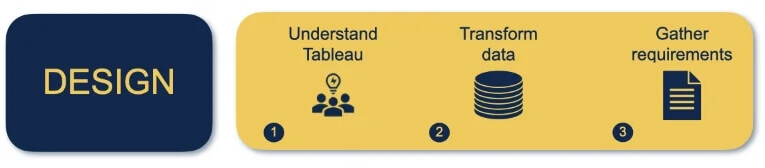
Module 1: Understanding Tableau
- What is possible
- How does Tableau deal with data
- Know your way around
- Review of Type Conversions
- How do we format charts
- Dashboard basics – My first Dashboard
Module 2: Transform Data
- Connecting to and setting up data in Tableau
- Modifying data attributes
- How Do I Structure my Data – Groups & Hierarchies, Visual Groups
- How Tableau Deals with Dates – Using Discrete and Continuous Dates, Custom Dates
- How do I create calculated fields and why? – Creating Calculated Fields, Types of calculated fields, Row Level v Aggregations, Aggregating dimensions in calculations, Changing the Level of Detail (LOD) of calculations – What, Why, How
Module 3: Gather Requirements (Online Content Only)
- Brainstorm and assess possible priorities
- Pitfalls to avoid
- Gather requirements
PHASE 1: DESIGN
Module 4: Create Charts
- Charts that Compare Multiple Measures – Measure Names and Measure Values, Shared Axis Charts, Dual Axis Charts, Scatter Plots
- Showing progress over time
- Creating Tables – Creating Tables, Highlight Tables, Heat Maps
- Showing Relational & Proportional Data – Pie Charts, Donut Charts, Tree Maps
- Making things dynamic with parameters
Module 5: Combine Data
- Relationships
- Joining Tables – Join Types, Joining tables within the same database, cross database joins, join calculations
- Blending – How to create a blend with common fields, Custom defined Field relationships and mismatched element names, Calculated fields in blended data sources
- Unions – Manual Unions and mismatched columns, Wildcard unions
- Data Extracts – Creating & Editing Data extracts
Module 6: Analyse Information
- Table Calculations
- Sets, Reference Lines, Trends and Forecasting
- Answering spatial questions – Mapping, Creating a choropleth (filled) map, Using your own images for spatial analysis, Mapping with spatial files
- Advanced charts
- Bar in Bar charts
- Bullet graphs
- Creating Bins and Histograms
- Creating a Box & Whisker plot
- Viz in Tooltips
Phase 2: DEVELOP

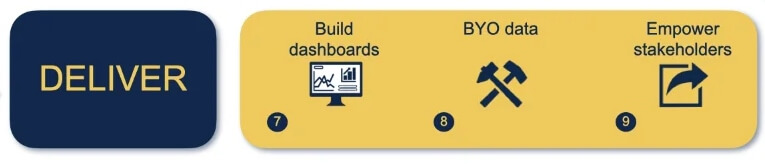
Module 7: Building Dashboards
- Using the Dashboard Interface
- Device layouts
- Dashboard Actions – Set actions, Parameter actions
- Viz in Tooltips for Dashboards
- Dashboard containers – Horizontal & Vertical containers, Hidden containers
- Navigate between dashboards
- Telling data driven stories
Module 8: Bring Your Own Data
- Design
- Best Practices & Resources
- Wireframe templates
- Questions
- Process
- Start building and testing
Module 9: Empower Stakeholders
- What is Tableau Server
- Publishing & permissions
- How can your users engage with content
- The Tableau ecosystem
- Review your progress
- Your next steps
Phase 3: Deliver
How Much Time Will This Take?
Designed to fit around your team — with structured learning, live support, and long-term access.
6 Weeks of Live Coaching
Learn by Doing (On Your Own Data)
Outcome:
Faster learning, deeper understanding, long-term retention
Support When You Need It
12 Months of Learning Materials
Stay Supported Beyond the Course
What This Transforms
This isn’t just training — it changes how your team works with data.
From a disjointed understanding of Tableau
To clear knowledge of terminology and capability
From reactive, ad-hoc reporting
To empowering stakeholders to self-serve
From unclear stakeholder questions
To structured requirements that drive decisions
From uncertainty about learning Tableau
To confidently building charts, tables, and dashboards
From manually combining data
To efficient, scalable data modelling
From not knowing when or how to build dashboards
To confidently answering complex questions with data
From learning on demo data
To delivering real value using your own data
From ad-hoc data uploads and error-prone calculations
To reusable data connections and robust metrics
From spending time answering basic questions
To focusing on analysis that drives the business